Monday, 14 April 2014

User Profile Admin.

User Profile Admin

Unit Number: 323


1.2: Describe how to create and edit user and standard
profiles.

When creating a new user I need to know what access they require, What permissions are needed to certain folders and documents, and what groups they should be added to.

When I checked what access and permissions the user needed and what department they work in, I checked to see if there is another user created on AD with the same permissions and access, I would copy the user and create a new one, which saves time in creating a new user from scratch.

When I copy an existing user I get a box called "Copy Object - User", Which is shown below.


I would then Proceed to entering the new users name in to the "Copy Object - User", Where it says First name, Last Name, and full name.

I would also type the user name in to the "user login name", Which is shown Below.


Once I have Completed entering the user name, I would then proceed to the next settings in the list.


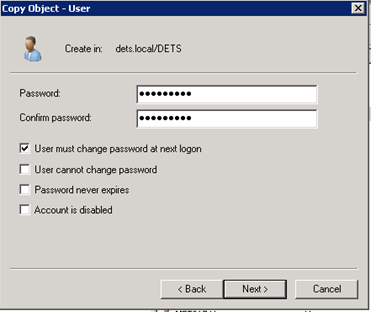
The next stage is to enter the password for the user for first time logging in, Which is shown below.

I would select "User must change password at next login", And select next on the settings.


Once I have selected next the new user will show up in AD in the list of users, I would right click the user name and select Properties and head to member of, And check to see if they are in the right groups. Which is shown below.


Once the user settings look correct, I would then proceed to handing them there new login and password, and explain how to use it.


Monday, 13 January 2014

Technical Fault Diagnosis

Fault Validation
Unit Code: 306  Unit Number: A/601/3293  Level 3


To ensure that the problem is actually a fault, I would ask my user to describe to me how the fault is causing the computer to function differently to what it usually does. I would also ask to check the fault myself; to confirm that it definitely is a fault.


INFORMATION GATHERING

To get the required information from the user, I need to ask specific questions so that I can diagnose the fault. A few questions that I asked are listed below:

·       When did the problem first begin?

The Problem started last week on Thursday at 12:32.

·       Was there anything that triggered the problem?

When pressing start on the software to run the instrument, that's when the problem happens.

·       Are there any physical signs of the problem?

An error message keeps popping up saying Software failed to start.

·       How has it affected you’re usage of the computer?

It has stopped me from running the instrument which needs to be sorted as I have to meet deadlines for test results to be entered in to lims.


INFORMATION ANALYSIS

With the information that I have gathered, I can diagnose the fault in several ways. For example, I can ask for an opinion from my colleague, search for an answer on google or use my own knowledge to diagnose the fault myself.


SOLUTION IDENTIFICATION

1.2

When a user contacts us with a problem they have with their system, we go through an initial diagnostics process using spiceworks that shows us the computer name and system specs, It also tells us if the computer has had problems in the past..

There are several criteria that we use when identifying a problem that the user has. These criteria are detailed below:


PROBLEM DESCRIPTION

The problem description is the initial explanation of the problem that the user is having. This is generally error messages that appear or a simple description of how the fault occurred and what it is preventing the user from doing.


PROBLEM HISTORY

We would check spiceworks tickets to see if the computer has had problems in the past, and what those problems were, we would also ask the user how long the problem has been going on.


PROBLEM LOCATION

Where the problem is located helps us to pinpoint whether anything in that location is causing the fault, and it also means that when we look at it we can find and identify it very quickly.


TECHNICAL INFORMATION ON A SPECIFIED RANGE OF PRODUCTS INCLUDING THE SYSTEM UNDER INVESTIGATION

Information such as this can help us find quick solutions to the problems. For example, if the system is experiencing hardware fault, technical information such as model numbers of serial numbers of the devices can help us obtain information for things such as checking warranty, or looking up replacement parts that are compatible with the system.


1.3

SUBSTITUTION

Substitution is typically used when a piece of equipment experiences hardware failure. This method simply involves swapping a piece of hardware out for a compatible or identical piece. The idea of this is to determine whether or not the piece of equipment is damaged.


REPLICATION

This is where a problem is replicated so that someone trying to repair it can see it for themselves. If you need to fix something, you need to be able to replicate the problem to be able to determine what the problem is, what is causing it and what actions need to be taken to fix it.


PERFORMANCE AND FUNCTIONAL TESTING

If a computer is running extremely slow, for example, performance and functional testing will test what is causing it to run slow, and what specifically is running slow. For example, if the computer is running at 100% CPU and is going very slow, performance and functioning testing can determine what applications or other things are making it go so slow.


ENVIRONMENT CHANGE

Environment change is where the problematic computer is moved to a different environment to see if the problem still occurs. For example, if a computer will not turn on at all, it could be moved to a different room to see whether the computer is broken or there is an electrical problem in the room it was previously in.

Environmental conditions can also affect the way a computer performs. For example, computers have operating temperatures that it must run within, or it will not work. This ranges from around 0c to about 45c. If the computer is running in conditions more extreme than this range, it may not function properly.

If a computer is overheating, moving it to a cooler environment would be an example of environment change, as it would be changed to a more optimal temperature for the computer to operate in.


1.4

MINIMISATION OF SERVICE DISRUPTION DURING DIAGNOSTICS

Many users need their hardware when it is damaged. What we try to do in most situations is to supply them with a spare to ensure that they can keep using it to meet their requirements (e.g. running an instrument).

If that is not an option, we try to use what they already have to provide them with a temporary solution to ensure that their job is not being effected while we try to fix the problem with their hardware.


INDIVIDUAL RESPONSIBILITY AND AUTHORITY

The responsibility and authority of the users is extremely important, as it can affect how important the computer is to them. If it is something that is vital for doing things such as running instruments, Entering Test results into lims, admin or financial work. Then it is crucial that the computer is fixed as soon as possible.


ESCALATION PROCEDURES

If we fail to fix the problems, the escalation procedure would be to contact the manufacturer and see if a repair can be arranged with them. If the product is still in warranty, this is possible to do for free. If the warranty has expired on the product, there will be a fee for a manufacturer repair.


ENVIRONMENT CHANGE

Certain faults may only occur in certain environments. For example, a laptop may not work running off a battery, but may work when plugged into the power. This environment change would identify that the fault is the battery pack.

Environment Change can also apply to the environmental conditions, such as acid corrosion. The computer case and components may get corroded over time and may result in hardware failure.


DETAILED TECHNICAL INFORMATION ON A RANGE OF PRODUCTS


Make: DELL
Model: GX270

Memory: 1GB
Processor: Intel Pentium @ 2GHz
Graphics: Nvidia
Hard Drive
: 80GB


All of the specifications and components are factory standard and have not been changed in any way.


THE PROBLEM: Broken Instrument Computer.

We recently received a Instrument computer from the lab, that won't switch on, the user says it stopped working in the middle of analysing samples in the lab and is vital it gets fixed as soon as possible.


2.1
APPROPRIATE DIAGNOSTIC TOOLS TO CARRY OUT NON-ROUTINE DIAGNOSIS

When we acquired the computer from the lab, the original diagnosed problem by the user was that the computer wouldn't switched on and it needed looked at.

To test the PC we had to switch the PC on to see if it was the power supply, as we switched the PC on the fans were spinning and that made us think the power supply is working and  it could be a graphic issue. When fitted a graphics card that was compatible with the motherboard.


We switched the PC back on and the screen started to load the OS up, and as this was booting the OS up the system showed a blue screen for a few seconds and restarted the PC and continued the boot.

We then declared the PC had a .DLL file that was corrupted and that is why the PC showed the a blue screen when the OS tried to boot.

We decided to run the OS repair tool that was supplied by the manufacturer, as we restarted the PC and placed the CD in the Drive, and let the PC boot back up a black screen showed up saying Disk Read Error, the PC may of had a hard drive failure which we had to replace the hard drive.

When we replaced the hard drive and installed the OS, we had to try and retrieve the results from the old dead drive, we placed the drive in an external drive bay that plugs in to the usb, when the PC booted up we found the usb drive and transferred the files from the external  drive to the computer drive, we also had to make sure it was placed in the right folder or the results may not be picked up by the software that reads the results and displays the results.


2.2
GIVEN SOURCES OF DIAGNOSTIC AND OTHER TECHNICAL INFORMATION
- Other Staff
I personally may not know a solution to a given problem. However, one of my colleagues may have experienced it before or may know something about the problem that I don’t. Asking another colleague is always a good source of information.

- The Internet
Search engines such as google can find someone an answer to almost any problem. If you have had a problem with a certain laptop, chances are that someone else in the world has, and there is a solution waiting for you on the internet. The internet is an invaluable wealth of information.

- Specialist Companies
Our company may have limited capabilities when it comes to sources of technical information or diagnostic information. Specialist companies however may be able to help in situations that we cannot. For example, our diagnostics may be limited and we may not be able to replace every single part to identify a fault one, whereas a manufacturer who has every single part of a specified machine has this capability.

- Specialist Software
Certain pieces of software can be used to identify problems or diagnose faults. For example, if a laptop keeps overheating, specialist software can be used to identify what exact component is getting too hot.


2.3
IDENTIFY AND INTERPRET RELEVANT INFORMATION TO SUPPORT THE DIAGNOSIS

The user has explained to me that the computer wasn't switching on and it stopped running during the instrument analysing
samples, The user says it stopped running in the middle of the night. This makes me believe that acid may  have caused the computer to stop running as the computer has acid corrosion on and in the computer case.
 
The problem is to identify what is really causing the issue with the computer, with the computer not switching on it is harder to diagnose as I can't use diagnosing software, such as Spiceworks.
To get the computer to turn on i would have to check inside the case and change the power supply, to allow me to use the diagnosing software to identify what the problem is and if it has been fixed.
 
 2.4
ANALYSE INFORMATION TO DIAGNOSE FAULTS WITH A WIDE RANGE OF CAUSES, USING AT LEAST THREE OF THE FOLLOWING APPROACHES

TREND ANALYSIS

The company has a lot of pc's running the same instrument as the one that has encounter problem.

We checked the other pc's to see if they have encounter the same issue, But they have not encounter the issue.

WHAT-IF SCENARIOS

The PSU Issue:
We had to change  a few cables and parts on the PC to make sure the problem was the PSU, We had to change the Fuse in the AC cable that powers the PSU which the PC still wouldn't start up, so we thought the cable may of had a nip inside the cable it self, so we changed the cable to make sure that the cable worked, Unfortunately it wasn't the cable so we had to change the PSU in the computer which resulted in the computer starting up, Due to the computer PSU shutting down the system with out saving the OS Files, the Hard drive failed to start, So we had to make sure that the hard drive wasn't dead so we placed it in another pc that was the same spec and found out it was a DLL file that is needed to run the OS which resulted in reinstalling the OS, we did however had to retrieve files that was saved on to the hard drive for the user to submit the results from the last instrument run.


GAP ANALYSIS
To make sure the problem wasn't the AC cable I tested using another working AC cable in the office, I had to make sure that the hard drive wasn't broken ether by fitting it in another pc that is the same spec.


IDENTIFICATION OF CAUSE AND EFFECT
IDENTIFICATION
Trying to switch the pc on which resulted in the PSU failure, Hard drive in another computer came up with BSOD with a cause of a DLL file crash.

CAUSE
PSU stopped running and crashed the OS without saving system files, Psu had corroded from the acid.


EFFECT
PSU not starting up due to PSU failure.


3.
3.1
Here is what needs to be taken into account when selecting a suitable remedy:


  • BUSINESS OR SERVICE IMPACT
    The user is unable to run the instrument without a pc that is required to store analysed soil samples, The pc is needed to run and store analysed instrument test in to lims.

  • RESOURCE AND SKILL AVAILABILITY
     A PSU that is the same voltage as the old on is available, and an OS that is Windows XP 32bit.

  • EASE OF IMPLEMENTATION
    the side panel unscrewed and took off, the screws took out of PSU and cables disconnected from mainboard and CD drive, hard drive, New PSU installed and cables connected, screws screwed in to PSU to keep in place and Side panel back on and screws screwed back in.

  • COST EFFECTIVENESS
    As we have had a spare PSU in the storage area, yet if we had to buy a new one we could of picked one up for around 10 to 15 pound from a local or online retailer.

  • PERFORMANCE
    As we had to change the PSU the performance would have been the same, Yet as we had to reinstall the OS and all required software the pc was running much quicker that it was originally, due to old files clogging up the system.

  • COMPATIBILITY
    The PSU had to be at least 400w or More to run the PC components, The OS had to have a valid Licence, But as we had the OS box still in the office we could install it with ease.

  • TIME
    We had to get the PC up and running with in our time limit which was 4 hours deadline, Installing OS took around one hour to complete and about 15 minutes to install the PSU.

PERMANENCE
Hopefully the PSU should last another two years but we will keep an eye on all our systems even the one we recently fixed to make sure it won't happen again.


3.2
POSSIBLE WAYS TO PREVENT REOCCURRENCE OF DIAGNOSED FAULTS
A PSU is not common in failing in our systems so we check all our systems using Spiceworks to make sure that all our pc's are up and running and check the tickets to see if any arise about any pc problems.


-  PSU Replacement

When we replaced the psu we had to make sure that it won't happen again so we told the user to report the problem asap, We will have the PSU in the office so we can replace the psu asap.

- OS Reinstall
We will make sure all our OS are ready at hand as it may become vital to install an OS on the hard drive, We will also have other software to search for files on dead drive for the user to retrieve.


4.1
REPORT


  • Fault description
    The computer PSU won't start up which resulted in replacing the PSU, The hard drive also failed to load the OS which resulted in BSOD, as we had to reinstall the OS to get everything up and running.

  • Supporting information
     The computer clearly won't start up as the PSU is broken, The funny burn smell shows the PSU burnt out, When the psu has been replaced the boot screen shows the os failed to start and shows a BSOD with windows error logs.   
  • diagnostic tools etc. used
    I used Linux to access the hard drive and retrieve the documents to give to the user that lost the documents from the hard drive.  

  • cause of the fault
    The cause could be a number of things such as, power cut, wrong voltage to PSU, AC cable not connected correctly, age of PSU.   

  • remedy selected
    To Change the PSU and retrieve documents the user might need that is not saved to the network drive and transfer them over to a usb device using linux to access the OS files.
  • once everything is transferred over I would proceed to install the OS using the same product key on the side of the case, and install all the required software the Pc may need.   


Monday, 16 December 2013

Customer Care in ICT


Verbal Communication
Unit code: 321                             Unit reference number: J/601/3507
 
Non-Verbal Techniques
-Eye contact with employee's on their arrival is important to make sure they are aware of your presence. Not maintaining eye contact during a conversation can give the impression or boredom or rudeness.
-Body language can be used to make team members look approachable to employees e.g. do not cross your arms.
-Hand gestures can emphasise your enthusiasm for a product and make explanations clearer
-Even if there are no employees in sight, it is unprofessional to slouch around.
-Smiling when talking. (Even on the phone)

-Listen carefully to details such as the spelling of names, addresses and phone numbers. Any errors due to inattentiveness can cause problems further down the line e.g. with deliveries.

-It is important not just to HEAR the Employees but to LISTEN to their questions/ complaints so that the appropriate action can be taken for those employees exact needs.


Positive and Negative Language
POSITIVE LANGUAGE:
-Friendly welcomes and polite introductions
-Compliments to the employees
-Thanking the employees for their payment/custom
-Addressing the employees as Sir/Madam
-Politeness and courteousness come across most clearly in your language.

NEGATIVE LANGUAGE:
-Swearing
-Moaning
-Sarcasm or rudeness
-Shouting
-It is important not to be overly casual or informal with Employees.

Active Listening
It is important to make sure that the employees knows you are listening to them and want to help them with their query or take their complaint seriously.

An active listener would use the following techniques:
-Body language e.g. Nodding as the employees talks
-Summarising their query/ complaint to show you understand
-Paraphrasing what you are going to do to help them/solve their problem.
-Being aware of facial expressions to show interest rather than boredom.

Listening Barriers
-Background music that is turned up too loud can hinder verbal communication and create an unfriendly atmosphere. It is important that songs/radio stations are vetted so that no swearing/ inappropriate music will be played.
-Team members should avoid having too many chats outside of their breaks when Employees are present. This can cause unnecessary distraction from Employees who may be seeking help or advice.
-If the store's phone line is often very busy there should be someone close by at all times to limit the noise and distraction it may cause. A phone that rings on and on also suggests disorganised uncaring staff.
Types of Questions
When taking to Employees or on the phone there are different types of questions that are needed to be asked so the correct answers can be given, such as:

Closed questions
A closed question is where the question is answerd by a Yes or No.

Examples of closed question:
Are you feeling better?
Is this the only computer in the lab?
Do you know if this computer has ever had this problem before?


Open questions
A open question is where the question can be answerd with a sentanse or a list.

Examples of open questions:
How do you know if this computer is working at its full capability?
Can you explain how to use this instrument?
Can you list what software is installed on this computer?


Verbal communication is essential to good employees service both while in the main lab and dealing with Employees queries or complaints over the telephone.

Whilst selling:
-A friendly tone of voice when asking employees if you can help them will encourage employees to talk to you. This is the first point of contact with the employees and verbal communication is an important part of forming this first impression.
-Members of the store team represent the store and brand and slang, swearing, sarcasm and moaning presents a negative, unprofessional and inappropriate impression.

Whilst on the phone:
-Politeness is crucial, especially if an employee is complaining as poor verbal communication can only cause them further agitation.
-It is important to speak clearly and slowly so that there is no room for confusion.

Monday, 25 November 2013


Describe Technical Advice
and Guidance in DETS.
 

Computers in DETS need to run at high speed to keep the instruments working and to get results in on time, to ensure the computers are running at high speed we use a web app that scans the network for computers called spiceworks.

If a user comes up to us or submits a ticket in spiceworks saying the computer is running really slow, we would then check in spiceworks inventory for the computer to see if there is any error, updates or check drive space.

If the computer’s hard drive is full then I would go to the computer to see what was taking up the space, if the user has saved documents or files to the hard drive, I would then decide to move all their work to the network drive which should free up space.

Once I have freed up space on the hard drive I would test the PC to make sure it is running quicker, if the PC is running quicker then I would tell the user to make sure to save any documents or files to the network, to keep the PC running at optimal speed.


Note"If this looks unfinished, this is because my assessor is checking my work."